


Microsoft AZ-801 Exam Practice Questions (P. 3)
- Full Access (315 questions)
- One Year of Premium Access
- Access to one million comments
- Seamless ChatGPT Integration
- Ability to download PDF files
- Anki Flashcard files for revision
- No Captcha & No AdSense
- Advanced Exam Configuration
Question #21
HOTSPOT -
Your network contains an Active Directory Domain Services (AD DS) domain. The domain contains servers that run Windows Server as shown in the following table.
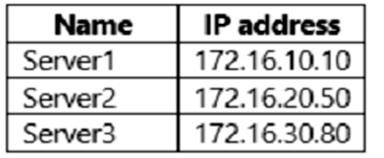
Server1 has the connection security rules shown in the following table.
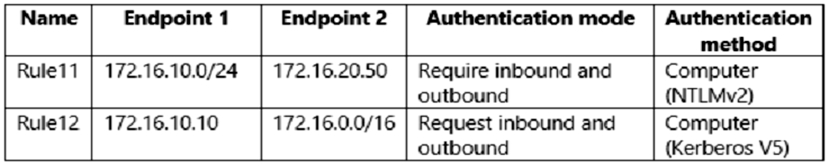
Server2 has the connection security rules shown in the following table.
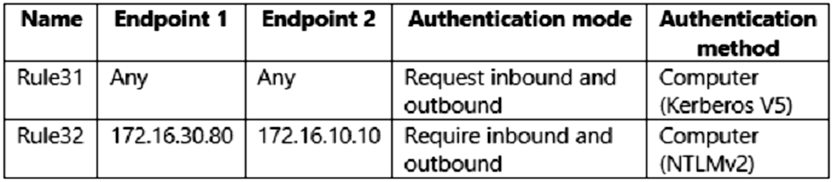
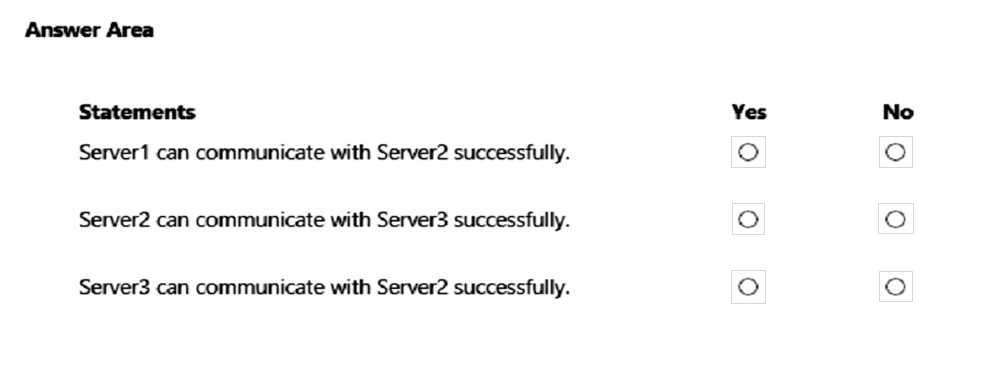
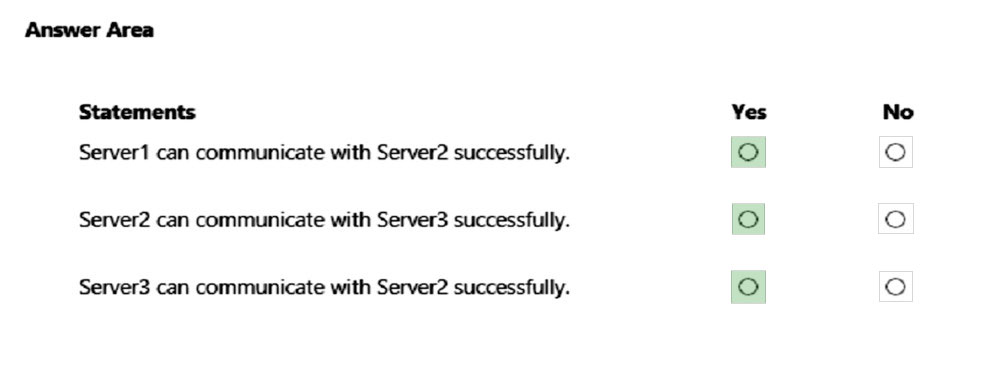
For each of the following statements, select Yes if the statement is true. Otherwise, select No.
NOTE: Each correct selection is worth one point.
Hot Area:
Your network contains an Active Directory Domain Services (AD DS) domain. The domain contains servers that run Windows Server as shown in the following table.
Server1 has the connection security rules shown in the following table.
Server2 has the connection security rules shown in the following table.
For each of the following statements, select Yes if the statement is true. Otherwise, select No.
NOTE: Each correct selection is worth one point.
Hot Area:
Correct Answer:
Reference:
https://docs.microsoft.com/en-us/windows/security/threat-protection/windows-firewall/change-rules-from-request-to-require-mode
Reference:
https://docs.microsoft.com/en-us/windows/security/threat-protection/windows-firewall/change-rules-from-request-to-require-mode
Question #22
Note: This question is part of a series of questions that present the same scenario. Each question in the series contains a unique solution that might meet the stated goals. Some question sets might have more than one correct solution, while others might not have a correct solution.
After you answer a question in this section, you will NOT be able to return to it. As a result, these questions will not appear in the review screen.
You have a failover cluster named Cluster1 that hosts an application named App1.
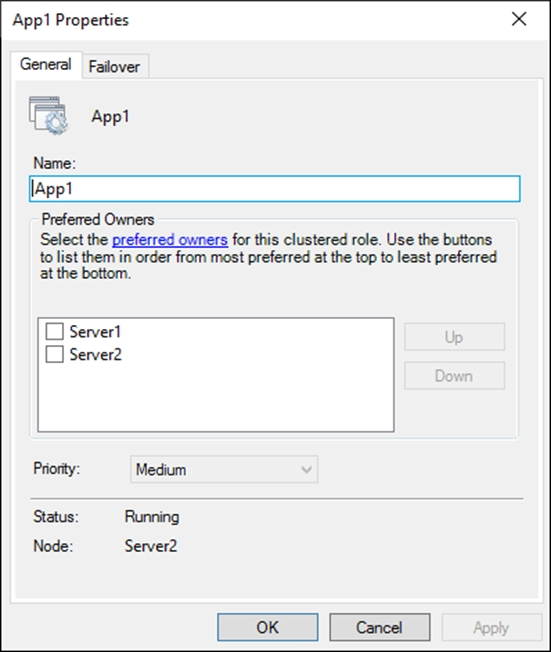
The General tab in App1 Properties is shown in the General exhibit. (Click the General tab.)
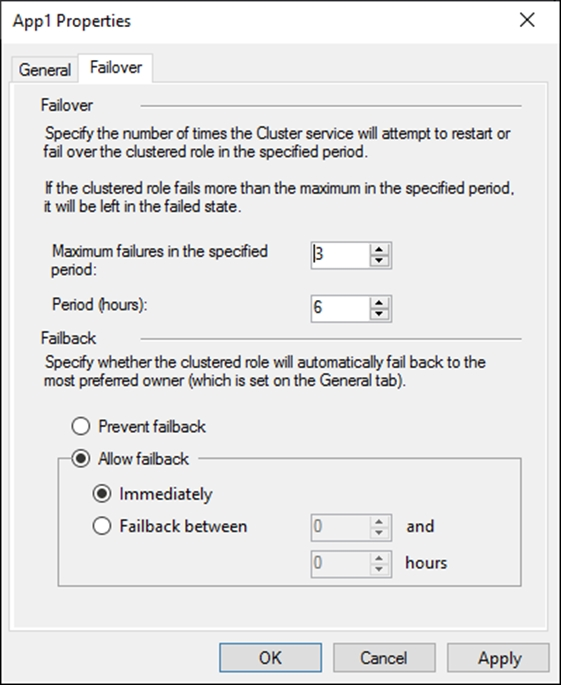
The Failover tab in App1 Properties is shown in the Failover exhibit. (Click the Failover tab.)
Server1 shuts down unexpectedly.
You need to ensure that when you start Server1, App1 continues to run on Server2.
Solution: From the Failover settings, you select Prevent failback.
Does this meet the goal?
After you answer a question in this section, you will NOT be able to return to it. As a result, these questions will not appear in the review screen.
You have a failover cluster named Cluster1 that hosts an application named App1.
The General tab in App1 Properties is shown in the General exhibit. (Click the General tab.)
The Failover tab in App1 Properties is shown in the Failover exhibit. (Click the Failover tab.)
Server1 shuts down unexpectedly.
You need to ensure that when you start Server1, App1 continues to run on Server2.
Solution: From the Failover settings, you select Prevent failback.
Does this meet the goal?
Question #23
Note: This question is part of a series of questions that present the same scenario. Each question in the series contains a unique solution that might meet the stated goals. Some question sets might have more than one correct solution, while others might not have a correct solution.
After you answer a question in this section, you will NOT be able to return to it. As a result, these questions will not appear in the review screen.
You have a failover cluster named Cluster1 that hosts an application named App1.
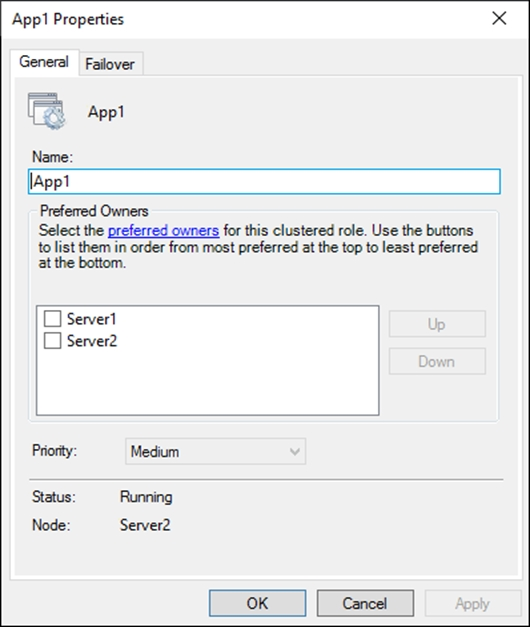
The General tab in App1 Properties is shown in the General exhibit. (Click the General tab.)
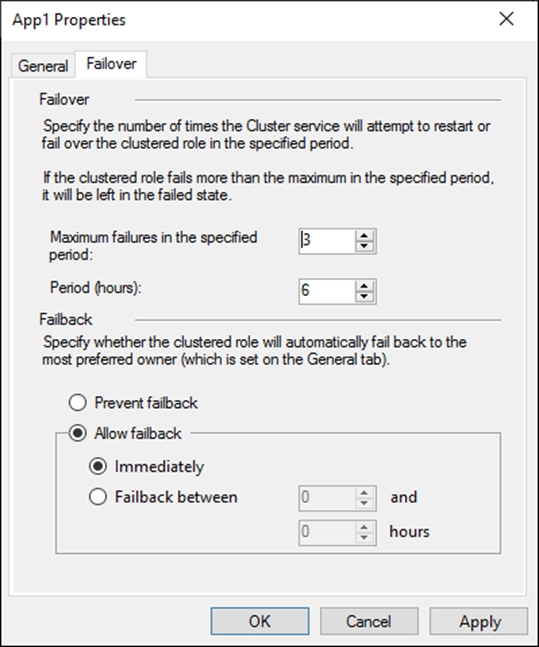
The Failover tab in App1 Properties is shown in the Failover exhibit. (Click the Failover tab.)
Server1 shuts down unexpectedly.
You need to ensure that when you start Server1, App1 continues to run on Server2.
Solution: You increase Maximum failures in the specified period for the App1 cluster role.
Does this meet the goal?
After you answer a question in this section, you will NOT be able to return to it. As a result, these questions will not appear in the review screen.
You have a failover cluster named Cluster1 that hosts an application named App1.
The General tab in App1 Properties is shown in the General exhibit. (Click the General tab.)
The Failover tab in App1 Properties is shown in the Failover exhibit. (Click the Failover tab.)
Server1 shuts down unexpectedly.
You need to ensure that when you start Server1, App1 continues to run on Server2.
Solution: You increase Maximum failures in the specified period for the App1 cluster role.
Does this meet the goal?
Question #24
Note: This question is part of a series of questions that present the same scenario. Each question in the series contains a unique solution that might meet the stated goals. Some question sets might have more than one correct solution, while others might not have a correct solution.
After you answer a question in this section, you will NOT be able to return to it. As a result, these questions will not appear in the review screen.
You have a failover cluster named Cluster1 that hosts an application named App1.
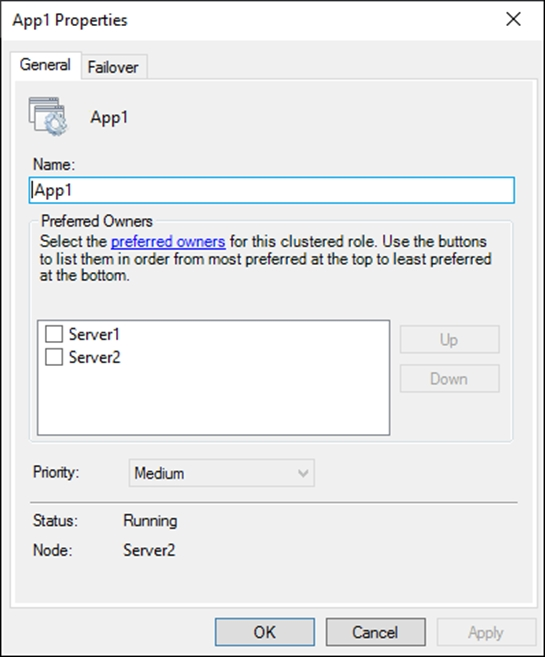
The General tab in App1 Properties is shown in the General exhibit. (Click the General tab.)
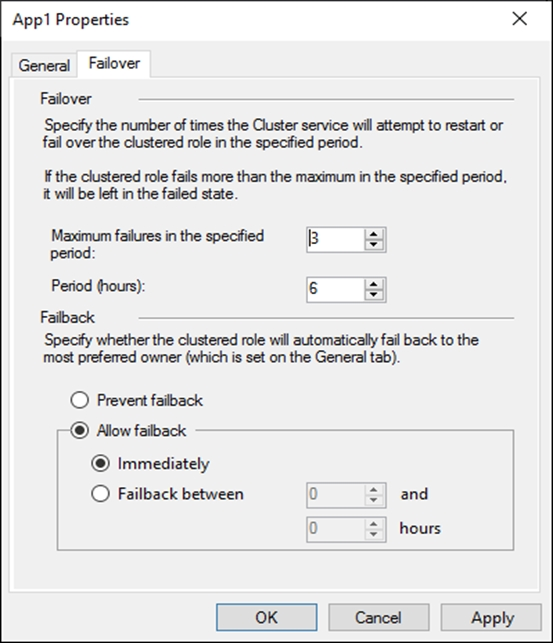
The Failover tab in App1 Properties is shown in the Failover exhibit. (Click the Failover tab.)
Server1 shuts down unexpectedly.
You need to ensure that when you start Server1, App1 continues to run on Server2.
Solution: From the General settings, you move Server2 up.
Does this meet the goal?
After you answer a question in this section, you will NOT be able to return to it. As a result, these questions will not appear in the review screen.
You have a failover cluster named Cluster1 that hosts an application named App1.
The General tab in App1 Properties is shown in the General exhibit. (Click the General tab.)
The Failover tab in App1 Properties is shown in the Failover exhibit. (Click the Failover tab.)
Server1 shuts down unexpectedly.
You need to ensure that when you start Server1, App1 continues to run on Server2.
Solution: From the General settings, you move Server2 up.
Does this meet the goal?
Question #26
HOTSPOT -
You have a failover cluster named FC1 that contains two nodes named Server1 and Server2. FC1 is configured to use a file share witness.
You plan to configure FC1 to use a cloud witness.
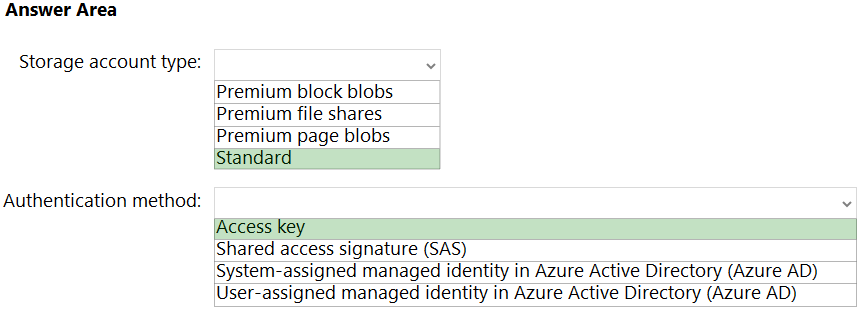
You need to configure Azure Storage accounts for the cloud witness.
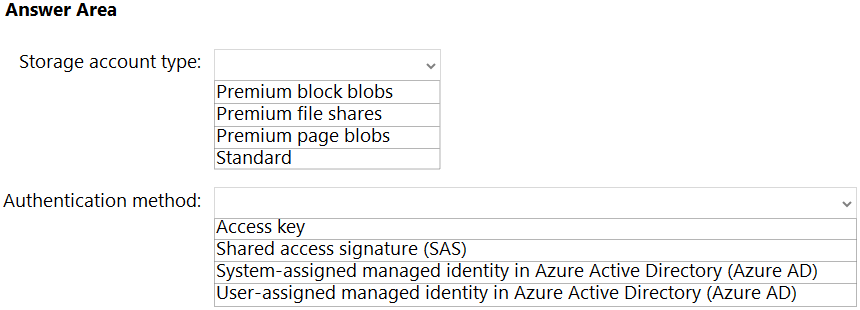
Which storage account type and authorization method should you configure? To answer, select the appropriate options in the answer area.
NOTE: Each correct selection is worth one point.
Hot Area:
You have a failover cluster named FC1 that contains two nodes named Server1 and Server2. FC1 is configured to use a file share witness.
You plan to configure FC1 to use a cloud witness.
You need to configure Azure Storage accounts for the cloud witness.
Which storage account type and authorization method should you configure? To answer, select the appropriate options in the answer area.
NOTE: Each correct selection is worth one point.
Hot Area:
Correct Answer:
Reference:
https://docs.microsoft.com/en-us/windows-server/failover-clustering/deploy-cloud-witness
Reference:
https://docs.microsoft.com/en-us/windows-server/failover-clustering/deploy-cloud-witness
Question #28
DRAG DROP -
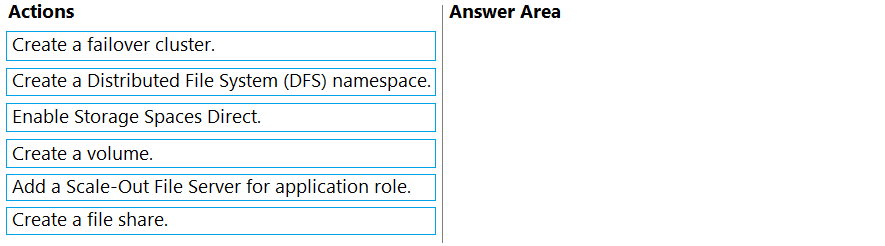
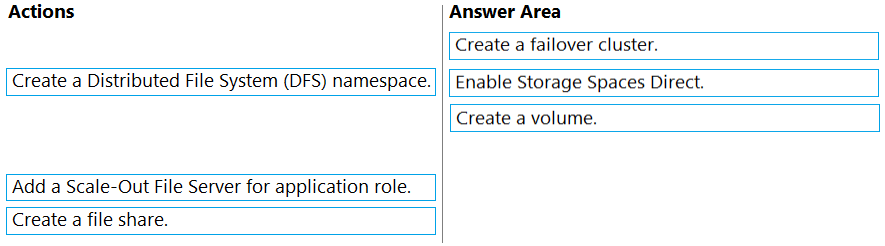
You need to create a Hyper-V hyper-converged cluster that stores virtual machines by using Storage Spaces Direct.
Which three actions should you perform in sequence? To answer, move the appropriate actions from the list of actions to the answer area and arrange them in the correct order.
Select and Place:
You need to create a Hyper-V hyper-converged cluster that stores virtual machines by using Storage Spaces Direct.
Which three actions should you perform in sequence? To answer, move the appropriate actions from the list of actions to the answer area and arrange them in the correct order.
Select and Place:
Correct Answer:
Reference:
https://docs.microsoft.com/en-us/system-center/vmm/s2d-hyper-converged?view=sc-vmm-2019
Reference:
https://docs.microsoft.com/en-us/system-center/vmm/s2d-hyper-converged?view=sc-vmm-2019
Question #29
You have a Storage Spaces Direct configuration that has persistent memory and contains the data volumes shown in the following table.
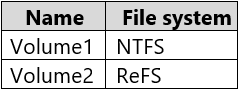
You plan to add data volumes to Storage Spaces Direct as shown in the following table.
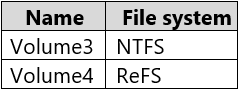
On which volumes can you use direct access (DAX)?
You plan to add data volumes to Storage Spaces Direct as shown in the following table.
On which volumes can you use direct access (DAX)?
Question #30
HOTSPOT -
You have a failover cluster named Cluster1 that contains three nodes.
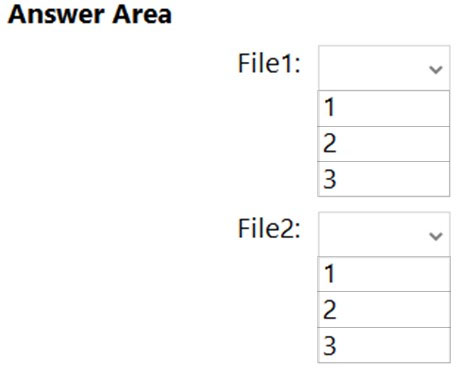
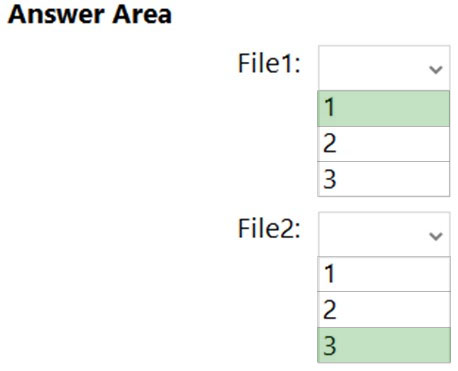
You plan to add two file server cluster roles named File1 and File2 to Cluster1. File1 will use the File Server for general use role. File2 will use the Scale-Out File
Server for application data role.
What is the maximum number of nodes for File1 and File2 that can concurrently serve client connections? To answer, select the appropriate options in the answer area.
NOTE: Each correct selection is worth one point.
Hot Area:
You have a failover cluster named Cluster1 that contains three nodes.
You plan to add two file server cluster roles named File1 and File2 to Cluster1. File1 will use the File Server for general use role. File2 will use the Scale-Out File
Server for application data role.
What is the maximum number of nodes for File1 and File2 that can concurrently serve client connections? To answer, select the appropriate options in the answer area.
NOTE: Each correct selection is worth one point.
Hot Area:
Correct Answer:
Reference:
https://docs.microsoft.com/en-us/windows-server/failover-clustering/sofs-overview
Reference:
https://docs.microsoft.com/en-us/windows-server/failover-clustering/sofs-overview
All Pages