


Microsoft AZ-801 Exam Practice Questions (P. 2)
- Full Access (315 questions)
- One Year of Premium Access
- Access to one million comments
- Seamless ChatGPT Integration
- Ability to download PDF files
- Anki Flashcard files for revision
- No Captcha & No AdSense
- Advanced Exam Configuration
Question #13
HOTSPOT -
Your network contains an Active Directory Domain Services (AD DS) forest. The forest contains the domains shown in the following table.
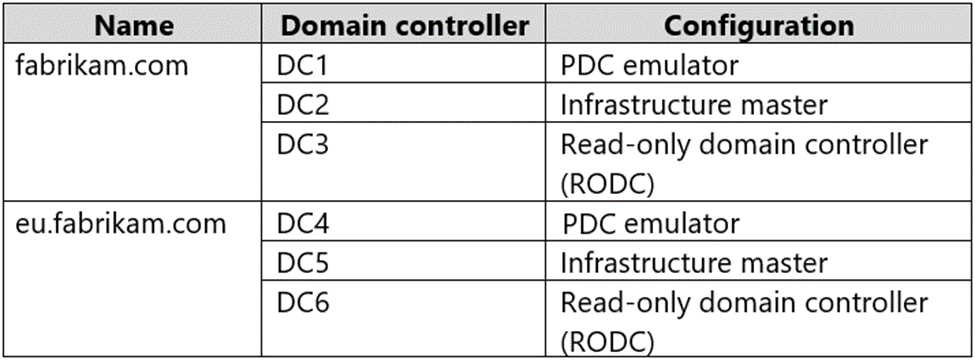
You are implementing Microsoft Defender for Identity sensors.
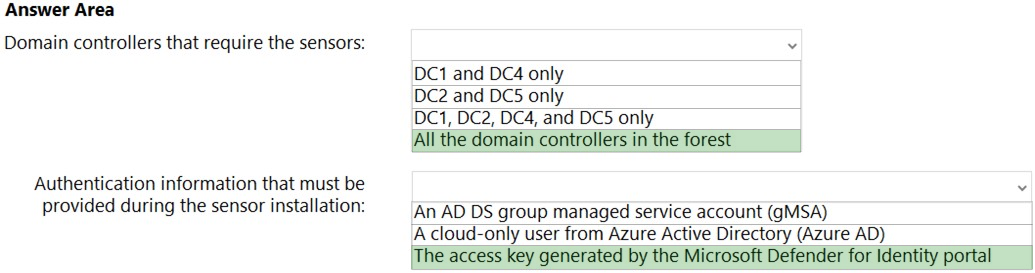
You need to install the sensors on the minimum number of domain controllers. The solution must ensure that Defender for Identity will detect all the security risks in both the domains.
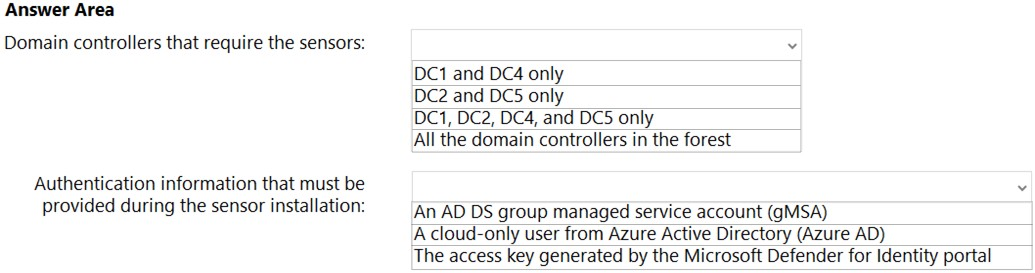
What should you identify? To answer, select the appropriate options in the answer area.
NOTE: Each correct selection is worth one point.
Hot Area:
Your network contains an Active Directory Domain Services (AD DS) forest. The forest contains the domains shown in the following table.
You are implementing Microsoft Defender for Identity sensors.
You need to install the sensors on the minimum number of domain controllers. The solution must ensure that Defender for Identity will detect all the security risks in both the domains.
What should you identify? To answer, select the appropriate options in the answer area.
NOTE: Each correct selection is worth one point.
Hot Area:
Correct Answer:
Reference:
https://docs.microsoft.com/en-us/defender-for-identity/technical-faq#deployment https://docs.microsoft.com/en-us/defender-for-identity/install-step4
Reference:
https://docs.microsoft.com/en-us/defender-for-identity/technical-faq#deployment https://docs.microsoft.com/en-us/defender-for-identity/install-step4
Question #17
You have a server that runs Windows Server. The server is configured to encrypt all incoming traffic by using a connection security rule.
You need to ensure that Server1 can respond to the unencrypted tracert commands initiated from computers on the same network.
What should you do from Windows Defender Firewall with Advanced Security?
You need to ensure that Server1 can respond to the unencrypted tracert commands initiated from computers on the same network.
What should you do from Windows Defender Firewall with Advanced Security?
- AFrom the IPsec Settings, configure IPsec defaults.
- BCreate a new custom outbound rule that allows ICMPv4 protocol connections for all profiles.
- CChange the Firewall state of the Private profile to Off.
- DFrom the IPsec Settings, configure IPsec exemptions.
Correct Answer:
D
D
 GPT
GPT
Creating an IPsec exemption specifically for ICMP traffic allows tracert commands, which rely on ICMP messages, to bypass the encryption requirements and respond properly even when the server has a general rule to encrypt all incoming traffic. This setting is essential for enabling basic network diagnostic capabilities like tracert, which do not function effectively under strict IPsec encryption policies. Hence, configuring IPsec exemptions for ICMP is the most suitable choice for maintaining both security protocols and network troubleshooting functionality.
Question #19
HOTSPOT -
Your network contains an Active Directory Domain Services (AD DS) domain. The domain contains a server named Server1 that runs Windows Server.
You run Get-BitLockerVolume -MountPoint C,D | fl *, which generates the following output.
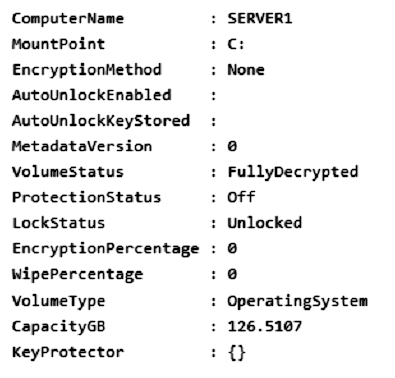
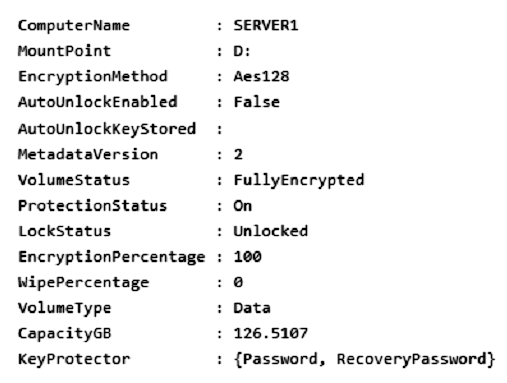
You need to ensure that volume D will be unlocked automatically when Server1 restarts.
How should you complete the command? To answer, select the appropriate options in the answer area.
NOTE: Each correct selection is worth one point.
Hot Area:

Your network contains an Active Directory Domain Services (AD DS) domain. The domain contains a server named Server1 that runs Windows Server.
You run Get-BitLockerVolume -MountPoint C,D | fl *, which generates the following output.
You need to ensure that volume D will be unlocked automatically when Server1 restarts.
How should you complete the command? To answer, select the appropriate options in the answer area.
NOTE: Each correct selection is worth one point.
Hot Area:
Correct Answer:

Box 1: Add-BitLockerKeyProtector
From the exhibit we see for volume D that AutoUnlockEnabled is False, and AutoUnlockKeyStored is empty.
The Add-BitLockerKeyProtector cmdlet adds a protector for the volume key of the volume protected with BitLocker Drive Encryption.
Example: The following example adds an ADAccountOrGroup protector to the previously encrypted operating system volume using the SID of the account:
Add-BitLockerKeyProtector C: -ADAccountOrGroupProtector -ADAccountOrGroup S-1-5-21-3651336348-8937238915-291003330-500
Active Directory-based protectors are normally used to unlock Failover Cluster enabled volumes.
Box 2: Service -
The -Service parameter indicates that the system account for this computer unlocks the encrypted volume.
Add-BitLockerKeyProtector syntax with use of the ADAccountOrGroupProtector parameter:
Add-BitLockerKeyProtector -
[-MountPoint] <String[]>
[-ADAccountOrGroupProtector]
[-ADAccountOrGroup] <String>
[-Service]
[-WhatIf]
[-Confirm]
[<CommonParameters>]
Incorrect:
* Enable-BitLockerAutoUnlock
The Enable-BitLockerAutoUnlock cmdlet enables automatic unlocking for a volume protected by BitLocker Disk Encryption.
The command has no -ADAccountOrGroupProtector parameter.
Syntax:
Enable-BitLockerAutoUnlock -
[-MountPoint] <String[]>
[-WhatIf]
[-Confirm]
[<CommonParameters>]
* The Clear-BitLockerAutoUnlock cmdlet removes all automatic unlocking keys used by BitLocker Drive Encryption. BitLocker stores these keys for the fixed data drives of a system on a volume that hosts a BitLocker-enabled operating system volume so that it can automatically unlock the fixed and removable data volumes in a system. This makes it easier for users to access data volumes.
Syntax: Clear-BitLockerAutoUnlock []
Reference:
https://docs.microsoft.com/en-us/windows/security/information-protection/bitlocker/bitlocker-use-bitlocker-drive-encryption-tools-to-manage-bitlocker https://docs.microsoft.com/en-us/powershell/module/bitlocker/add-bitlockerkeyprotector
Box 1: Add-BitLockerKeyProtector
From the exhibit we see for volume D that AutoUnlockEnabled is False, and AutoUnlockKeyStored is empty.
The Add-BitLockerKeyProtector cmdlet adds a protector for the volume key of the volume protected with BitLocker Drive Encryption.
Example: The following example adds an ADAccountOrGroup protector to the previously encrypted operating system volume using the SID of the account:
Add-BitLockerKeyProtector C: -ADAccountOrGroupProtector -ADAccountOrGroup S-1-5-21-3651336348-8937238915-291003330-500
Active Directory-based protectors are normally used to unlock Failover Cluster enabled volumes.
Box 2: Service -
The -Service parameter indicates that the system account for this computer unlocks the encrypted volume.
Add-BitLockerKeyProtector syntax with use of the ADAccountOrGroupProtector parameter:
Add-BitLockerKeyProtector -
[-MountPoint] <String[]>
[-ADAccountOrGroupProtector]
[-ADAccountOrGroup] <String>
[-Service]
[-WhatIf]
[-Confirm]
[<CommonParameters>]
Incorrect:
* Enable-BitLockerAutoUnlock
The Enable-BitLockerAutoUnlock cmdlet enables automatic unlocking for a volume protected by BitLocker Disk Encryption.
The command has no -ADAccountOrGroupProtector parameter.
Syntax:
Enable-BitLockerAutoUnlock -
[-MountPoint] <String[]>
[-WhatIf]
[-Confirm]
[<CommonParameters>]
* The Clear-BitLockerAutoUnlock cmdlet removes all automatic unlocking keys used by BitLocker Drive Encryption. BitLocker stores these keys for the fixed data drives of a system on a volume that hosts a BitLocker-enabled operating system volume so that it can automatically unlock the fixed and removable data volumes in a system. This makes it easier for users to access data volumes.
Syntax: Clear-BitLockerAutoUnlock []
Reference:
https://docs.microsoft.com/en-us/windows/security/information-protection/bitlocker/bitlocker-use-bitlocker-drive-encryption-tools-to-manage-bitlocker https://docs.microsoft.com/en-us/powershell/module/bitlocker/add-bitlockerkeyprotector
Question #20
HOTSPOT -
Your network contains an on-premises Active Directory Domain Services (AD DS) domain named contoso.com. The domain contains the accounts shown in the following table.
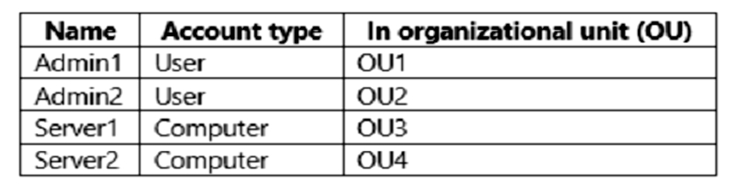
The domain is configured to store BitLocker recovery keys in Active Directory.
Admin1 and Admin2 perform the following configurations:
1. Admin1 turns on BitLocker Drive Encryption (BitLocker) for volume C on Server1.
2. Admin1 moves Server1 to OU1.
3. Admin2 turns on BitLocker for removable volume E on Server2.
4. Admin2 moves removable volume E from Server2 to Server1 and unlocks the volume.
On which Active Directory object can you view each BitLocker recovery key? To answer, select the appropriate options in the answer area.
NOTE: Each correct selection is worth one point.
Hot Area:
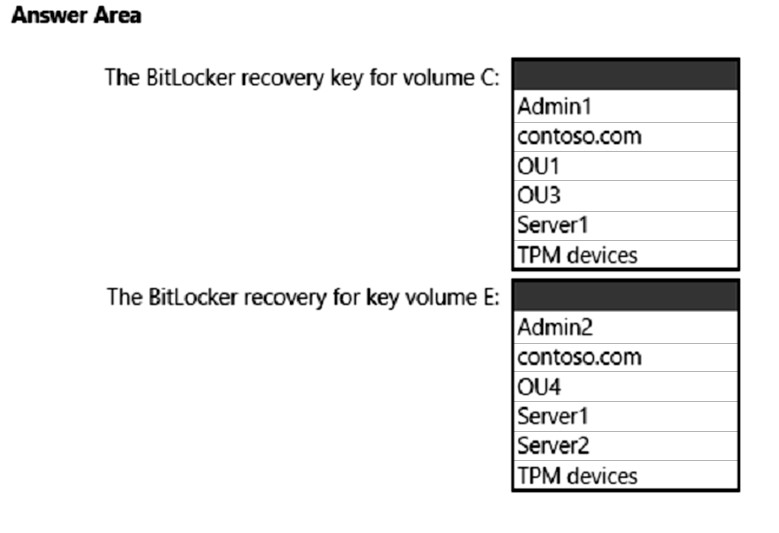
Your network contains an on-premises Active Directory Domain Services (AD DS) domain named contoso.com. The domain contains the accounts shown in the following table.
The domain is configured to store BitLocker recovery keys in Active Directory.
Admin1 and Admin2 perform the following configurations:
1. Admin1 turns on BitLocker Drive Encryption (BitLocker) for volume C on Server1.
2. Admin1 moves Server1 to OU1.
3. Admin2 turns on BitLocker for removable volume E on Server2.
4. Admin2 moves removable volume E from Server2 to Server1 and unlocks the volume.
On which Active Directory object can you view each BitLocker recovery key? To answer, select the appropriate options in the answer area.
NOTE: Each correct selection is worth one point.
Hot Area:
Correct Answer:
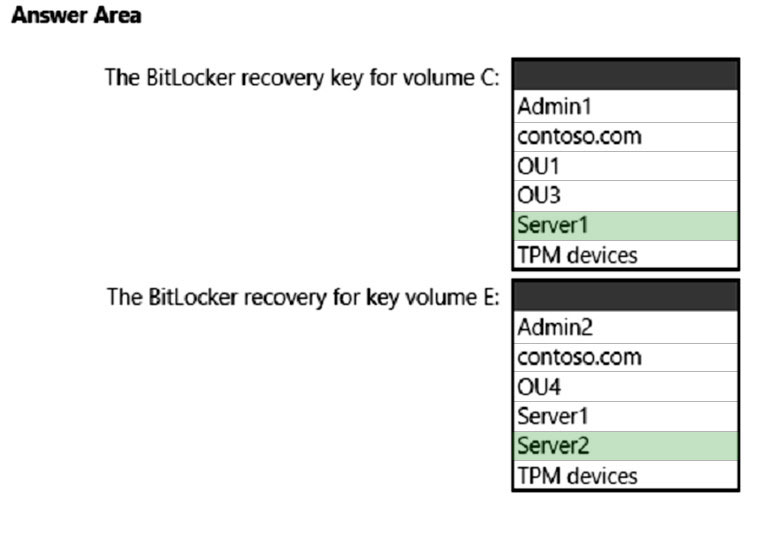
Box 1: Server1 -
You can configure Group Policies in your domain so that when encrypting any drive with BitLocker, the computer will save the recovery key in its computer object account in AD (like storing a local computer administrator password generated using LAPS).
Box 2: Server2 -
Reference:
http://woshub.com/store-bitlocker-recovery-keys-active-directory/
Box 1: Server1 -
You can configure Group Policies in your domain so that when encrypting any drive with BitLocker, the computer will save the recovery key in its computer object account in AD (like storing a local computer administrator password generated using LAPS).
Box 2: Server2 -
Reference:
http://woshub.com/store-bitlocker-recovery-keys-active-directory/
All Pages