


Microsoft AZ-120 Exam Practice Questions (P. 5)
- Full Access (414 questions)
- One Year of Premium Access
- Access to one million comments
- Seamless ChatGPT Integration
- Ability to download PDF files
- Anki Flashcard files for revision
- No Captcha & No AdSense
- Advanced Exam Configuration
Question #42
HOTSPOT -
You deploy SAP HANA by using SAP HANA on Azure (Large Instances).
For each of the following statements, select Yes if the statement is true. Otherwise, select No.
NOTE: Each correct selection is worth one point.
Hot Area:
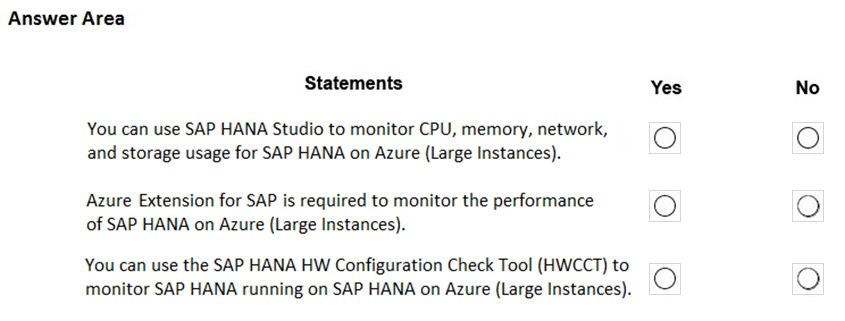
You deploy SAP HANA by using SAP HANA on Azure (Large Instances).
For each of the following statements, select Yes if the statement is true. Otherwise, select No.
NOTE: Each correct selection is worth one point.
Hot Area:
Correct Answer:
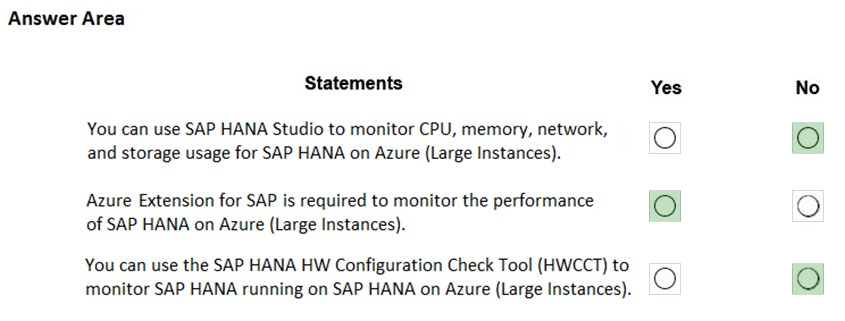
Box 1: No -
Box 2: Yes -
The SAP Azure Enhanced Monitoring Extension allows for collecting diagnostic data including OS and Application performance counters from Azure VMs running
SAP workloads.
Box 3: No -
Reference:
https://www.linkedin.com/pulse/important-operational-concepts-around-azure-extension-apparao-sanam
Box 1: No -
Box 2: Yes -
The SAP Azure Enhanced Monitoring Extension allows for collecting diagnostic data including OS and Application performance counters from Azure VMs running
SAP workloads.
Box 3: No -
Reference:
https://www.linkedin.com/pulse/important-operational-concepts-around-azure-extension-apparao-sanam
Question #45
DRAG DROP -
You need to connect SAP HANA on Azure (Large Instances) to an Azure Log Analytics workspace.
Which four actions should you perform in sequence? To answer, move the appropriate actions from the list of actions to the answer area and arrange them in the correct order.
Select and Place:
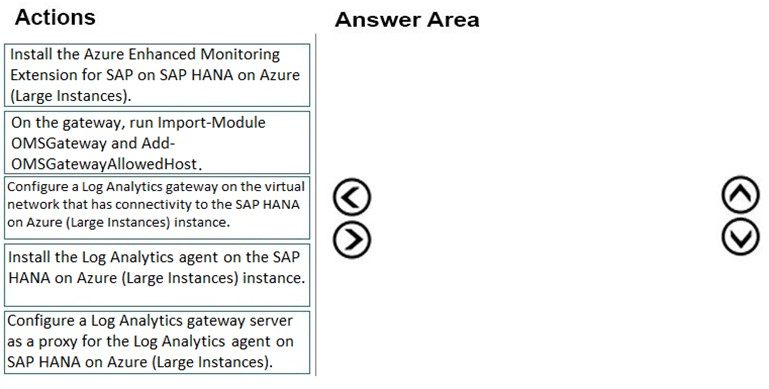
You need to connect SAP HANA on Azure (Large Instances) to an Azure Log Analytics workspace.
Which four actions should you perform in sequence? To answer, move the appropriate actions from the list of actions to the answer area and arrange them in the correct order.
Select and Place:
Correct Answer:
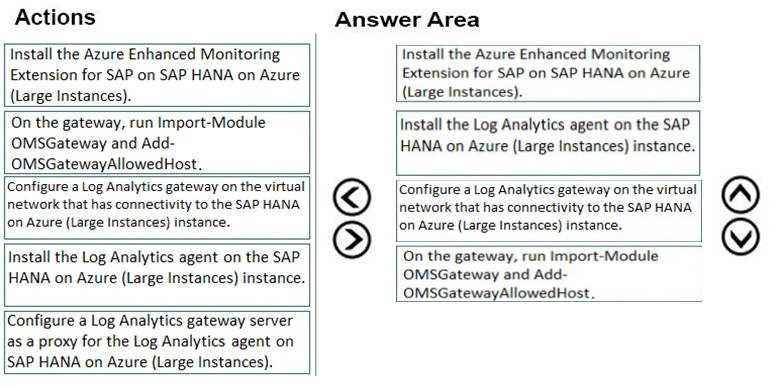
Step 1: Install the Azure Enhanced Monitoring.
The SAP Azure Enhanced Monitoring Extension allows for collecting diagnostic data including OS and Application performance counters from Azure VMs running
SAP workloads.
Step 2: Install the Log Analytics client on the SAP HANA on Azure (Large Instances) instance.
Step 3: Configure a Log Analytics gateway on the virtual network.
Step 4: On the gateway, run.
Reference:
http://www.deployazure.com/compute/virtual-machines/sap-azure-enhanced-monitoring-extension/ https://docs.microsoft.com/en-us/azure/azure-monitor/platform/gateway
Step 1: Install the Azure Enhanced Monitoring.
The SAP Azure Enhanced Monitoring Extension allows for collecting diagnostic data including OS and Application performance counters from Azure VMs running
SAP workloads.
Step 2: Install the Log Analytics client on the SAP HANA on Azure (Large Instances) instance.
Step 3: Configure a Log Analytics gateway on the virtual network.
Step 4: On the gateway, run.
Reference:
http://www.deployazure.com/compute/virtual-machines/sap-azure-enhanced-monitoring-extension/ https://docs.microsoft.com/en-us/azure/azure-monitor/platform/gateway
Question #46
HOTSPOT -
You are planning the Azure network infrastructure for an SAP environment.
For each of the following statements, select Yes if the statement is true. Otherwise, select No.
NOTE: Each correct selection is worth one point.
Hot Area:

You are planning the Azure network infrastructure for an SAP environment.
For each of the following statements, select Yes if the statement is true. Otherwise, select No.
NOTE: Each correct selection is worth one point.
Hot Area:
Correct Answer:

Box 1: Yes -
Box 2: No -
A design that's not supported is the segregation of the SAP application layer and the DBMS layer into different Azure virtual networks that aren't peered with each other. We recommend that you segregate the SAP application layer and DBMS layer by using subnets within an Azure virtual network instead of by using different
Azure virtual networks.
Box 3: Yes -
Be aware that network traffic between two peered Azure virtual networks is subject to transfer costs. Huge data volume that consists of many terabytes is exchanged between the SAP application layer and the DBMS layer. You can accumulate substantial costs if the SAP application layer and DBMS layer are segregated between two peered Azure virtual networks.
Reference:
https://docs.microsoft.com/en-us/azure/virtual-machines/workloads/sap/dbms_guide_general
Box 1: Yes -
Box 2: No -
A design that's not supported is the segregation of the SAP application layer and the DBMS layer into different Azure virtual networks that aren't peered with each other. We recommend that you segregate the SAP application layer and DBMS layer by using subnets within an Azure virtual network instead of by using different
Azure virtual networks.
Box 3: Yes -
Be aware that network traffic between two peered Azure virtual networks is subject to transfer costs. Huge data volume that consists of many terabytes is exchanged between the SAP application layer and the DBMS layer. You can accumulate substantial costs if the SAP application layer and DBMS layer are segregated between two peered Azure virtual networks.
Reference:
https://docs.microsoft.com/en-us/azure/virtual-machines/workloads/sap/dbms_guide_general
Question #47
DRAG DROP -
You plan to deploy multiple SAP HANA virtual machines to Azure by using an Azure Resource Manager template.
How should you configure Accelerated Networking and Write Accelerator in the template? To answer, drag the appropriate values to the correct targets. Each value may be used once, more than once, or not at all. You may need to drag the split bar between panes or scroll to view content.
NOTE: Each correct selection is worth one point.
Select and Place:
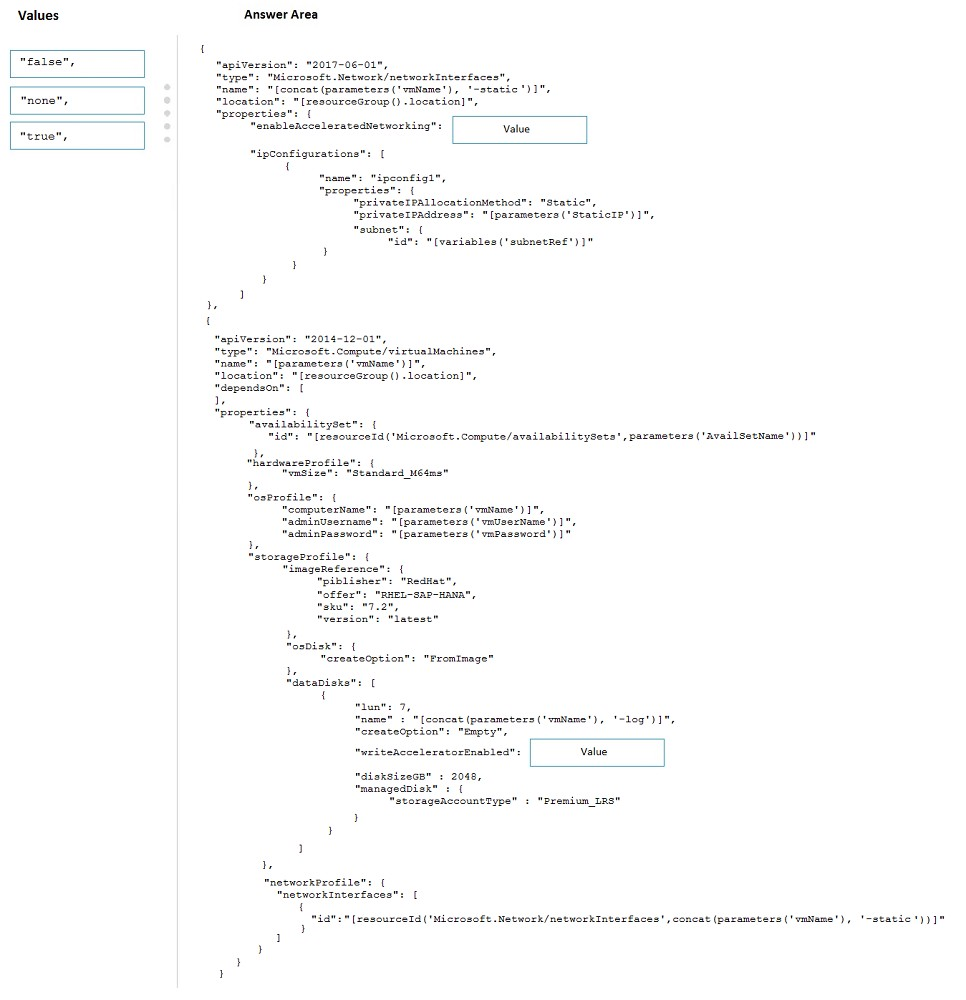
You plan to deploy multiple SAP HANA virtual machines to Azure by using an Azure Resource Manager template.
How should you configure Accelerated Networking and Write Accelerator in the template? To answer, drag the appropriate values to the correct targets. Each value may be used once, more than once, or not at all. You may need to drag the split bar between panes or scroll to view content.
NOTE: Each correct selection is worth one point.
Select and Place:
Correct Answer:
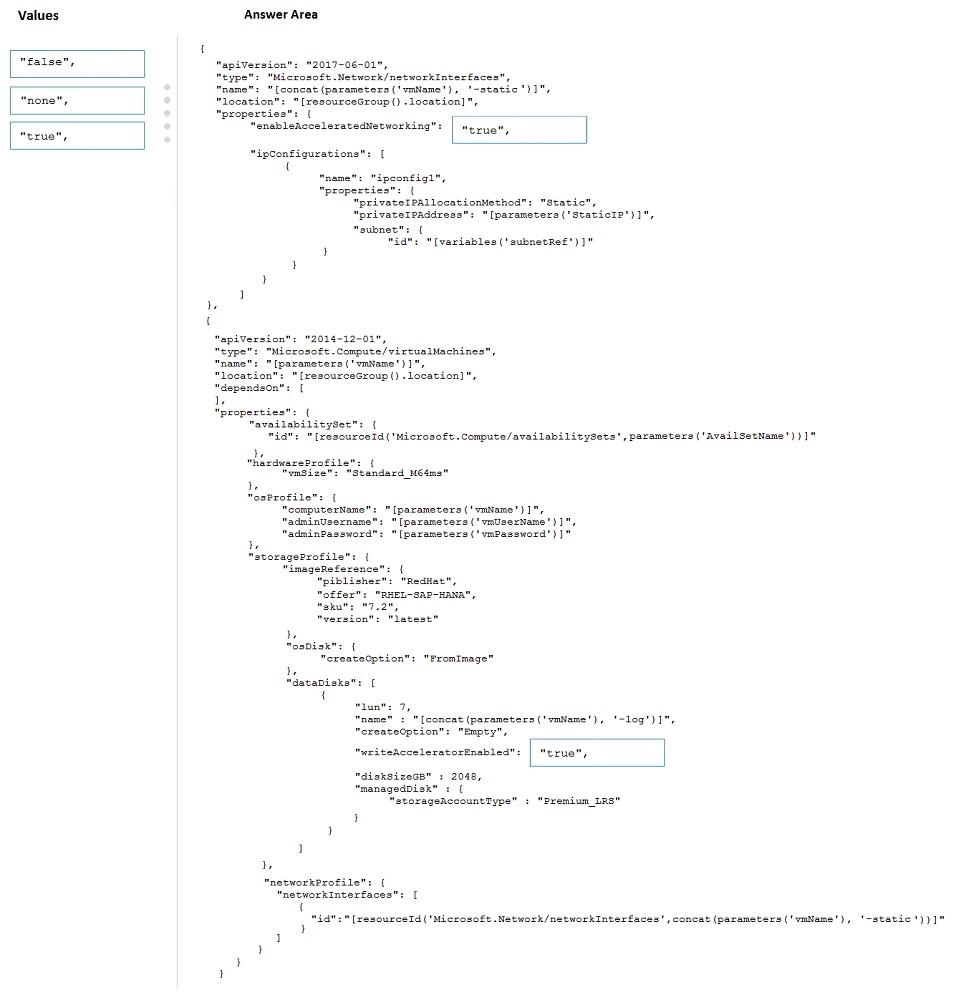
Box 1: true -
enableAcceleratedNetworking: If the network interface is accelerated networking enabled.
To further reduce network latency between Azure VMs, we [Micorosoft] recommend that you choose Azure Accelerated Networking. Use it when you deploy Azure
VMs for an SAP workload, especially for the SAP application layer and the SAP DBMS layer.
Box 2: true -
Write Accelerator should be used for the volumes that contain the transaction log or redo logs of a DBMS. It is not recommended to use Write Accelerator for the data volumes of a DBMS as the feature has been optimized to be used against log disks.
Reference:
https://docs.microsoft.com/en-us/azure/virtual-machines/workloads/sap/dbms_guide_general
Box 1: true -
enableAcceleratedNetworking: If the network interface is accelerated networking enabled.
To further reduce network latency between Azure VMs, we [Micorosoft] recommend that you choose Azure Accelerated Networking. Use it when you deploy Azure
VMs for an SAP workload, especially for the SAP application layer and the SAP DBMS layer.
Box 2: true -
Write Accelerator should be used for the volumes that contain the transaction log or redo logs of a DBMS. It is not recommended to use Write Accelerator for the data volumes of a DBMS as the feature has been optimized to be used against log disks.
Reference:
https://docs.microsoft.com/en-us/azure/virtual-machines/workloads/sap/dbms_guide_general
Question #49
HOTSPOT -
Your on-premises network contains SAP and non-SAP applications.
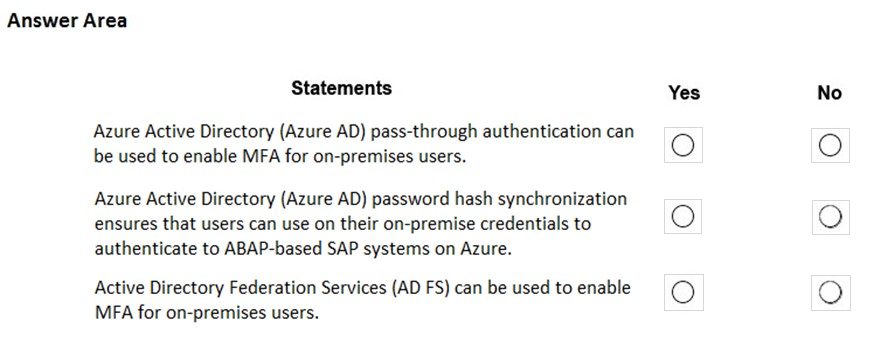
You have JAVA-based SAP systems that use SPNEGO for single-sign on (SSO) authentication.
Your external portal uses multi-factor authentication (MFA) to authenticate users.
You plan to extend the on-premises authentication features to Azure and to migrate the SAP applications to Azure.
For each of the following statements, select Yes if the statement is true. Otherwise, select No.
NOTE: Each correct selection is worth one point.
Hot Area:
Your on-premises network contains SAP and non-SAP applications.
You have JAVA-based SAP systems that use SPNEGO for single-sign on (SSO) authentication.
Your external portal uses multi-factor authentication (MFA) to authenticate users.
You plan to extend the on-premises authentication features to Azure and to migrate the SAP applications to Azure.
For each of the following statements, select Yes if the statement is true. Otherwise, select No.
NOTE: Each correct selection is worth one point.
Hot Area:
Correct Answer:
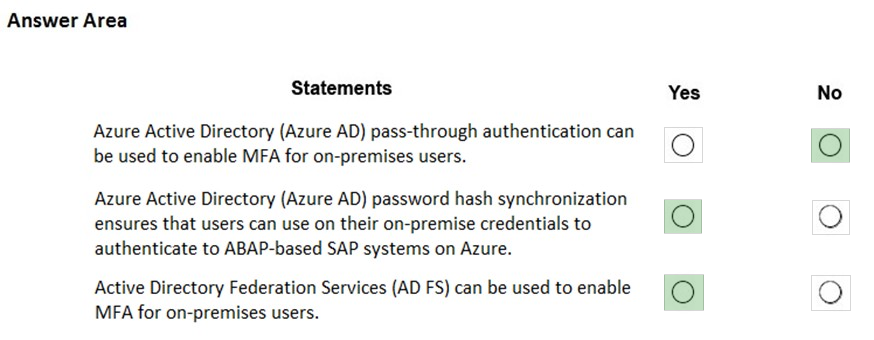
Box 1: No -
Need AD FS for MFA. See box 3.
Note: Azure Active Directory (Azure AD) Pass-through Authentication allows your users to sign in to both on-premises and cloud-based applications using the same passwords. This feature is an alternative to Azure AD Password Hash Synchronization (see Box 2).
Box 2: Yes -
Password hash synchronization is one of the sign-in methods used to accomplish hybrid identity. Azure AD Connect synchronizes a hash, of the hash, of a users password from an on-premises Active Directory instance to a cloud-based Azure AD instance.
Password hash synchronization is an extension to the directory synchronization feature implemented by Azure AD Connect sync. You can use this feature to sign in to Azure AD services like Office 365. You sign in to the service by using the same password you use to sign in to your on-premises Active Directory instance.
Box 3: Yes -
If your organization is federated with Azure AD, you can use Azure Multi-Factor Authentication to secure AD FS resources, both on-premises and in the cloud.
Azure MFA enables you to eliminate passwords and provide a more secure way to authenticate.
Reference:
https://docs.microsoft.com/en-us/azure/active-directory/hybrid/whatis-phs https://docs.microsoft.com/en-us/windows-server/identity/ad-fs/operations/configure-ad-fs-and-azure-mfa
Box 1: No -
Need AD FS for MFA. See box 3.
Note: Azure Active Directory (Azure AD) Pass-through Authentication allows your users to sign in to both on-premises and cloud-based applications using the same passwords. This feature is an alternative to Azure AD Password Hash Synchronization (see Box 2).
Box 2: Yes -
Password hash synchronization is one of the sign-in methods used to accomplish hybrid identity. Azure AD Connect synchronizes a hash, of the hash, of a users password from an on-premises Active Directory instance to a cloud-based Azure AD instance.
Password hash synchronization is an extension to the directory synchronization feature implemented by Azure AD Connect sync. You can use this feature to sign in to Azure AD services like Office 365. You sign in to the service by using the same password you use to sign in to your on-premises Active Directory instance.
Box 3: Yes -
If your organization is federated with Azure AD, you can use Azure Multi-Factor Authentication to secure AD FS resources, both on-premises and in the cloud.
Azure MFA enables you to eliminate passwords and provide a more secure way to authenticate.
Reference:
https://docs.microsoft.com/en-us/azure/active-directory/hybrid/whatis-phs https://docs.microsoft.com/en-us/windows-server/identity/ad-fs/operations/configure-ad-fs-and-azure-mfa
Question #50
HOTSPOT -
For each of the following statements, select Yes if the statement is true. Otherwise, select No.
NOTE: Each correct selection is worth one point.
Hot Area:
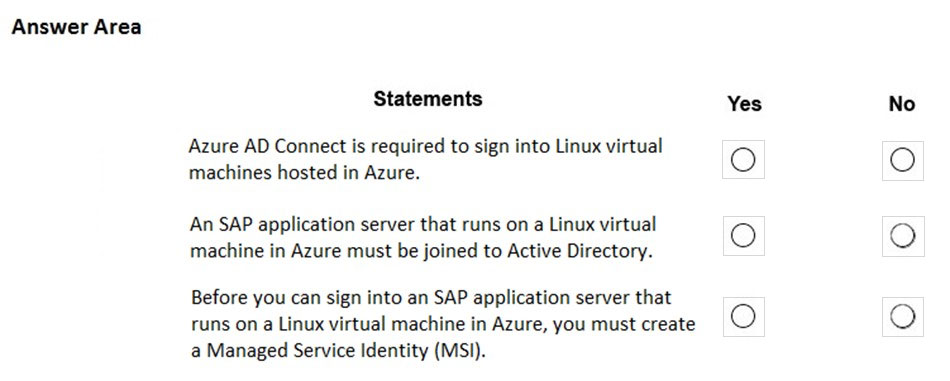
For each of the following statements, select Yes if the statement is true. Otherwise, select No.
NOTE: Each correct selection is worth one point.
Hot Area:
Correct Answer:
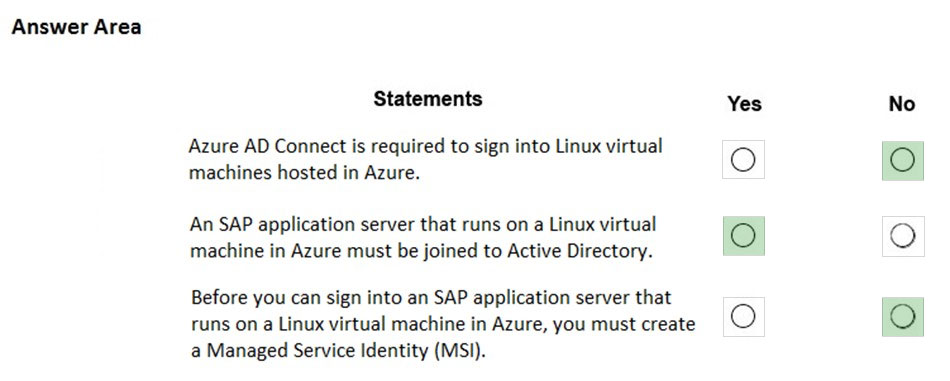
Box 1: No -
To log in to a Linux VM with Azure AD credentials, install the Azure Active Directory login VM extension.
Note: Azure AD Connect is the Microsoft tool designed to meet and accomplish your hybrid identity goals.
Box 2: Yes -
If you deploy SAP VMs in a cross-premises scenario, where on-premises Active Directory and DNS are extended in Azure, it is expected that the VMs are joining an on-premises domain.
Box 3: No -
Reference:
https://docs.microsoft.com/en-us/azure/virtual-machines/workloads/sap/deployment-guide
Box 1: No -
To log in to a Linux VM with Azure AD credentials, install the Azure Active Directory login VM extension.
Note: Azure AD Connect is the Microsoft tool designed to meet and accomplish your hybrid identity goals.
Box 2: Yes -
If you deploy SAP VMs in a cross-premises scenario, where on-premises Active Directory and DNS are extended in Azure, it is expected that the VMs are joining an on-premises domain.
Box 3: No -
Reference:
https://docs.microsoft.com/en-us/azure/virtual-machines/workloads/sap/deployment-guide
All Pages