
Databricks Certified Associate Developer for Apache Spark Exam Practice Questions (P. 5)
- Full Access (343 questions)
- One Year of Premium Access
- Access to one million comments
- Seamless ChatGPT Integration
- Ability to download PDF files
- Anki Flashcard files for revision
- No Captcha & No AdSense
- Advanced Exam Configuration
Question #41
The code block shown below should create and register a SQL UDF named "ASSESS_PERFORMANCE" using the Python function assessPerformance() and apply it to column customerSatisfaction in table stores. Choose the response that correctly fills in the numbered blanks within the code block to complete this task.
Code block:
spark._1_._2_(_3_, _4_)
spark.sql("SELECT customerSatisfaction, _5_(customerSatisfaction) AS result FROM stores")
Code block:
spark._1_._2_(_3_, _4_)
spark.sql("SELECT customerSatisfaction, _5_(customerSatisfaction) AS result FROM stores")
- A1. udf
2. register
3. "ASSESS_PERFORMANCE"
4. assessPerformance
5. ASSESS_PERFORMANCEMost Voted - B1. udf
2. register
3. assessPerformance
4. "ASSESS_PERFORMANCE"
5. "ASSESS_PERFORMANCE" - C1. udf
2. register
3."ASSESS_PERFORMANCE"
4. assessPerformance
5. "ASSESS_PERFORMANCE" - D1. register
2. udf
3. "ASSESS_PERFORMANCE"
4. assessPerformance
5. "ASSESS_PERFORMANCE" - E1. udf
2. register
3. ASSESS_PERFORMANCE
4. assessPerformance
5. ASSESS_PERFORMANCE
Correct Answer:
A
A
send
light_mode
delete
Question #42
The code block shown below contains an error. The code block is intended to create a Python UDF assessPerformanceUDF() using the integer-returning Python function assessPerformance() and apply it to column customerSatisfaction in DataFrame storesDF. Identify the error.
Code block:
assessPerformanceUDF – udf(assessPerformance)
storesDF.withColumn("result", assessPerformanceUDF(col("customerSatisfaction")))
Code block:
assessPerformanceUDF – udf(assessPerformance)
storesDF.withColumn("result", assessPerformanceUDF(col("customerSatisfaction")))
- AThe assessPerformance() operation is not properly registered as a UDF.
- BThe withColumn() operation is not appropriate here – UDFs should be applied by iterating over rows instead.
- CUDFs can only be applied vie SQL and not through the DataFrame API.
- DThe return type of the assessPerformanceUDF() is not specified in the udf() operation.Most Voted
- EThe assessPerformance() operation should be used on column customerSatisfaction rather than the assessPerformanceUDF() operation.
send
light_mode
delete
Question #43
The code block shown below contains an error. The code block is intended to use SQL to return a new DataFrame containing column storeId and column managerName from a table created from DataFrame storesDF. Identify the error.
Code block:
storesDF.createOrReplaceTempView("stores")
storesDF.sql("SELECT storeId, managerName FROM stores")
Code block:
storesDF.createOrReplaceTempView("stores")
storesDF.sql("SELECT storeId, managerName FROM stores")
- AThe createOrReplaceTempView() operation does not make a Dataframe accessible via SQL.
- BThe sql() operation should be accessed via the spark variable rather than DataFrame storesDF.Most Voted
- CThere is the sql() operation in DataFrame storesDF. The operation query() should be used instead.
- DThis cannot be accomplished using SQL – the DataFrame API should be used instead.
- EThe createOrReplaceTempView() operation should be accessed via the spark variable rather than DataFrame storesDF.
Correct Answer:
B
B
send
light_mode
delete
Question #44
The code block shown below should create a single-column DataFrame from Python list years which is made up of integers. Choose the response that correctly fills in the numbered blanks within the code block to complete this task.
Code block:
_1_._2_(_3_, _4_)
Code block:
_1_._2_(_3_, _4_)
- A1. spark
2. createDataFrame
3. years
4. IntegerType - B1. DataFrame
2. create
3. [years]
4. IntegerType - C1. spark
2. createDataFrame
3. [years]
4. IntegertType - D1. spark
2. createDataFrame
3. [years]
4. IntegertType() - E1. spark
2. createDataFrame
3. years
4. IntegertType()Most Voted
send
light_mode
delete
Question #45
The code block shown below contains an error. The code block is intended to cache DataFrame storesDF only in Spark’s memory and then return the number of rows in the cached DataFrame. Identify the error.
Code block:
storesDF.cache().count()
Code block:
storesDF.cache().count()
- AThe cache() operation caches DataFrames at the MEMORY_AND_DISK level by default – the storage level must be specified to MEMORY_ONLY as an argument to cache().
- BThe cache() operation caches DataFrames at the MEMORY_AND_DISK level by default – the storage level must be set via storesDF.storageLevel prior to calling cache().
- CThe storesDF DataFrame has not been checkpointed – it must have a checkpoint in order to be cached.
- DDataFrames themselves cannot be cached – DataFrame storesDF must be cached as a table.
- EThe cache() operation can only cache DataFrames at the MEMORY_AND_DISK level (the default) – persist() should be used instead.Most Voted
send
light_mode
delete
Question #46
Which of the following operations can be used to return a new DataFrame from DataFrame storesDF without inducing a shuffle?
- AstoresDF.intersect()
- BstoresDF.repartition(1)
- CstoresDF.union()Most Voted
- DstoresDF.coalesce(1)
- EstoresDF.rdd.getNumPartitions()
Correct Answer:
D
D
send
light_mode
delete
Question #47
The code block shown below contains an error. The code block is intended to return a new 12-partition DataFrame from the 8-partition DataFrame storesDF by inducing a shuffle. Identify the error.
Code block:
storesDF.coalesce(12)
Code block:
storesDF.coalesce(12)
- AThe coalesce() operation cannot guarantee the number of target partitions – the repartition() operation should be used instead.
- BThe coalesce() operation does not induce a shuffle and cannot increase the number of partitions – the repartition() operation should be used instead.Most Voted
- CThe coalesce() operation will only work if the DataFrame has been cached to memory – the repartition() operation should be used instead.
- DThe coalesce() operation requires a column by which to partition rather than a number of partitions – the repartition() operation should be used instead.
- EThe number of resulting partitions, 12, is not achievable for an 8-partition DataFrame.
Correct Answer:
B
B
send
light_mode
delete
Question #48
Which of the following Spark properties is used to configure whether DataFrame partitions that do not meet a minimum size threshold are automatically coalesced into larger partitions during a shuffle?
- Aspark.sql.shuffle.partitions
- Bspark.sql.autoBroadcastJoinThreshold
- Cspark.sql.adaptive.skewJoin.enabled
- Dspark.sql.inMemoryColumnarStorage.batchSize
- Espark.sql.adaptive.coalescePartitions.enabledMost Voted
Correct Answer:
E
E
send
light_mode
delete
Question #49
The code block shown below contains an error. The code block is intended to return a DataFrame containing a column openDateString, a string representation of Java’s SimpleDateFormat. Identify the error.
Note that column openDate is of type integer and represents a date in the UNIX epoch format – the number of seconds since midnight on January 1st, 1970.
An example of Java’s SimpleDateFormat is "Sunday, Dec 4, 2008 1:05 PM".
A sample of storesDF is displayed below:

Code block:
storesDF.withColumn("openDateString", from_unixtime(col("openDate"), "EEE, MMM d, yyyy h:mm a", TimestampType()))
Note that column openDate is of type integer and represents a date in the UNIX epoch format – the number of seconds since midnight on January 1st, 1970.
An example of Java’s SimpleDateFormat is "Sunday, Dec 4, 2008 1:05 PM".
A sample of storesDF is displayed below:

Code block:
storesDF.withColumn("openDateString", from_unixtime(col("openDate"), "EEE, MMM d, yyyy h:mm a", TimestampType()))
- AThe from_unixtime() operation only accepts two parameters – the TimestampTime() arguments not necessary.Most Voted
- BThe from_unixtime() operation only works if column openDate is of type long rather than integer – column openDate must first be converted.
- CThe second argument to from_unixtime() is not correct – it should be a variant of TimestampType() rather than a string.
- DThe from_unixtime() operation automatically places the input column in java’s SimpleDateFormat – there is no need for a second or third argument.
- EThe column openDate must first be converted to a timestamp, and then the Date() function can be used to reformat to java’s SimpleDateFormat.
Correct Answer:
A
A
send
light_mode
delete
Question #50
Which of the following code blocks returns a DataFrame containing a column dayOfYear, an integer representation of the day of the year from column openDate from DataFrame storesDF?
Note that column openDate is of type integer and represents a date in the UNIX epoch format – the number of seconds since midnight on January 1st, 1970.
A sample of storesDF is displayed below:
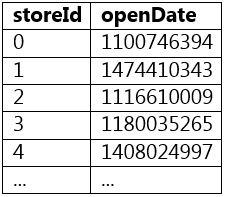
Note that column openDate is of type integer and represents a date in the UNIX epoch format – the number of seconds since midnight on January 1st, 1970.
A sample of storesDF is displayed below:
- A(storesDF.withColumn("openTimestamp", col("openDate").cast("Timestamp"))
. withColumn("dayOfYear", dayofyear(col("openTimestamp"))))Most Voted - BstoresDF.withColumn("dayOfYear", get dayofyear(col("openDate")))
- CstoresDF.withColumn("dayOfYear", dayofyear(col("openDate")))
- D(storesDF.withColumn("openDateFormat", col("openDate").cast("Date"))
. withColumn("dayOfYear", dayofyear(col("openDateFormat")))) - EstoresDF.withColumn("dayOfYear", substr(col("openDate"), 4, 6))
send
light_mode
delete
All Pages
