
NetSuite NetSuite Application Developer Exam Practice Questions (P. 2)
- Full Access (60 questions)
- One Year of Premium Access
- Access to one million comments
- Seamless ChatGPT Integration
- Ability to download PDF files
- Anki Flashcard files for revision
- No Captcha & No AdSense
- Advanced Exam Configuration
Question #6
A user error is thrown within the map stage of a map/reduce script. There are no try/catch block statements in the map stage. The summarize stage does not contain any logic. Which statements are true? (Choose two.)
- AThe map/reduce script continues to execute. Both the reduce and the summarize stages occur.
- BThe error is displayed on the Execution Log subtab when the summarize stage is completed.
- CThe error is not displayed on the Execution Log subtab even when the summarize stage is completed.
- DThe error is displayed on the Execution Log subtab when the map stage is completed.
- EThe map/reduce script stops executing within the map stage.
send
light_mode
delete
Question #7
A script uses the following code snippet to send an email to employees in the account.
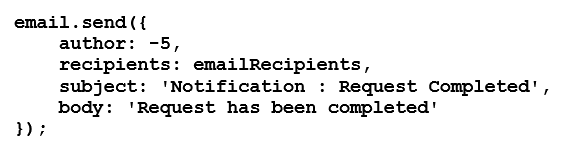
Assuming valid internal IDs for employees, which are the correct value assignments for emailRecipients? (Choose two.)

Assuming valid internal IDs for employees, which are the correct value assignments for emailRecipients? (Choose two.)
- A[record.load({type: record.Type.EMPLOYEE, id: 1}),2,3]
- B[1,2,3]
- C[1,'[email protected]',3]
- D
- E[{id: 1},{id: 2},{email:'[email protected]'}]
send
light_mode
delete
Question #8
A button was added to an existing Suitelet script below:
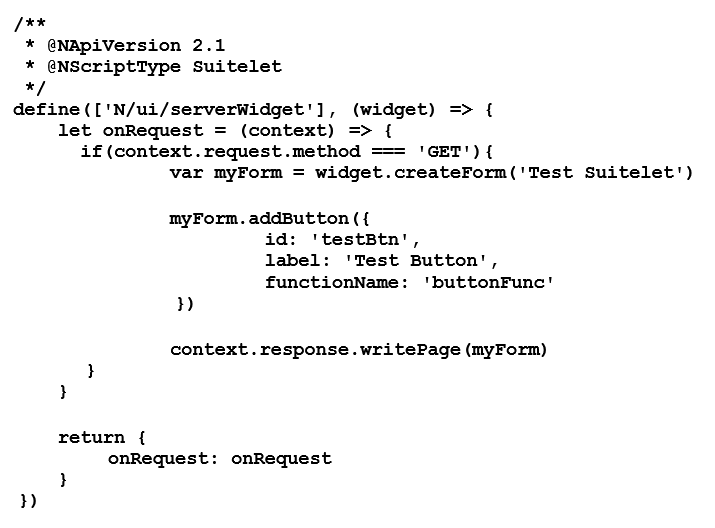
When the button is clicked, the Suitelet returns an "Uncaught ReferenceError: buttonFunc is not defined" error on the console. What is the next step to correct the error?

When the button is clicked, the Suitelet returns an "Uncaught ReferenceError: buttonFunc is not defined" error on the console. What is the next step to correct the error?
- ACreate a separate user event script file and add the button function to the file. Reference the user event script file using form.userEventScriptModulePath.
- BCreate a separate custom module file and add the button function to the file. Reference the button in the Suitelet script as part of the define() parameters.
- CNo need to create an extra file. Add the button function to the Suitelet script file so that it can be referenced internally.
- DCreate a separate client script file and add the button function to the file. Reference the client script file using form.clientScriptModulePath.
send
light_mode
delete
Question #9
A developer wants to create a field using script to display the date of the user currently logged in that also follows the user’s Date Format preference. Which modules can be used for this solution? (Choose two.)
send
light_mode
delete
Question #10
A user creates a Sales Order record in the user interface. One client script uses a saveRecord() entry point function and one user event script with beforeLoad(), beforeSubmit(), and afterSubmit() entry point functions deploy on the Sales Order record.
Which is the correct entry point execution sequence?
- AbeforeLoad() > saveRecord() > beforeSubmit() > afterSubmit()
- BsaveRecord() > beforeLoad() > beforeSubmit() > afterSubmit()
- CbeforeSubmit() > afterSubmit() > beforeLoad() > saveRecord()
- DbeforeLoad() > beforeSubmit() > saveRecord() > afterSubmit()
send
light_mode
delete
All Pages
