Fortinet FCP_FMG_AD-7.6 Exam Practice Questions (P. 1)
- Full Access (62 questions)
- One Year of Premium Access
- Access to one million comments
- Seamless ChatGPT Integration
- Ability to download PDF files
- Anki Flashcard files for revision
- No Captcha & No AdSense
- Advanced Exam Configuration
Question #1
You want to let multiple administrators work in the same ADOM without creating configuration conflicts.
What is the best and the most effective solution to apply?
- AConfigure RADIUS authentication to assign ADOM roles to each user.
- BEnable workflow mode, which is the only way to prevent concurrent configuration conflicts.
- CAssign administrators with JSON API access to the FortiManager.
- DActivate workspace mode in the ADOM settings.
send
light_mode
delete
Question #2
Refer to the exhibit.

If the monitored interface for the primary FortiManager device fails, what must you do to maintain high availability (HA)?

If the monitored interface for the primary FortiManager device fails, what must you do to maintain high availability (HA)?
- AThe FortiManager HA failover is transparent to administrators and does not require any additional action.
- BManually promote one of the working secondary devices to the primary role: and reboot the original primary device to remove the peer IP address of the failed device.
- CReconfigure the primary device to remove the peer IP address of the failed device from its configuration.
- DCheck the integrity database of the primary device to force a secondary device to become the new primary with all active interfaces.
send
light_mode
delete
Question #3
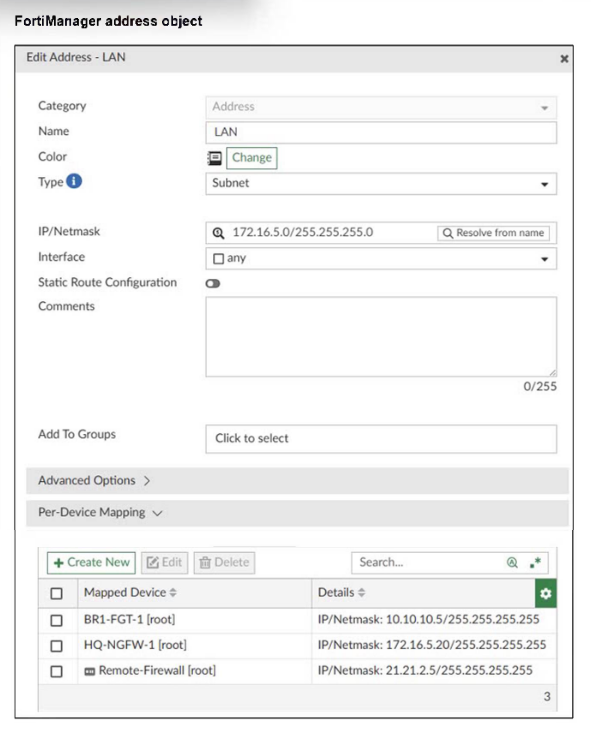
Refer to the exhibit.

An administrator has created a firewall address object that is used in multiple policy packages for multiple FortiGate devices in an ADOM.
After the installation operation is performed, which IP/netmask will be installed on Remote-Firewall [VDOM1] for the LAN firewall address object?

An administrator has created a firewall address object that is used in multiple policy packages for multiple FortiGate devices in an ADOM.
After the installation operation is performed, which IP/netmask will be installed on Remote-Firewall [VDOM1] for the LAN firewall address object?
- A21.21.2.5/255.255.255.255
- B172.16.5.20/255.255.255.255
- C172.16.5.0/255.255.255.0
- D10.10.10.5/255.255.255.255
send
light_mode
delete
Question #4
Refer to the exhibits.


An administrator needed to recover all the configurations related to the user, Support. The configurations were saved in configuration revision ID 9.
The administrator reverted the configuration using the Configuration Revision History window and received the CLI output shown in the exhibit.
What can you conclude from the CLI output?


An administrator needed to recover all the configurations related to the user, Support. The configurations were saved in configuration revision ID 9.
The administrator reverted the configuration using the Configuration Revision History window and received the CLI output shown in the exhibit.
What can you conclude from the CLI output?
- AThe administrator set the flag to 0 to prevent configuration overrides.
- BThe administrator reinstalled the policy package.
- CThe administrator needs to retrieve the device to correctly detect the FortiGate firmware version.
- DThe administrator installed only the device-level configuration.
send
light_mode
delete
Question #5
An administrator wants to configure and manage multiple objects in the FortiManager database and give access to other users who work in the same database.
To stay in control of the changes made to firewall policies by other team members, the administrator needs a setup where all modifications go through a central check before they can be installed.
How can the administrator create this setup?
To stay in control of the changes made to firewall policies by other team members, the administrator needs a setup where all modifications go through a central check before they can be installed.
How can the administrator create this setup?
- AEnable the prompt asking the administrator to accept firewall policies changes before saving.
- BEnable the workspace (for all ADOMs) to control all changes made by any administrator.
- CEnable device lock and the advanced mode feature in the ADOM.
- DEnable workflow mode and the ADOM lock feature.
send
light_mode
delete
All Pages